The Question Every Security Team Faces
Your IT team runs a vulnerability scanner on a schedule. It reports misconfigurations, missing patches, and outdated software across internal hosts. The dashboard turns green. Everyone feels safe.
But here is what that scanner never saw: what your infrastructure looks like from the outside. What an attacker sees when they look up your IP address at 2 AM. Which ports are reachable. Whether your origin server is hiding behind a CDN — or sitting fully exposed. Whether your TLS certificate is about to expire. Whether your HTTP headers are missing the controls that browsers rely on to protect your users.
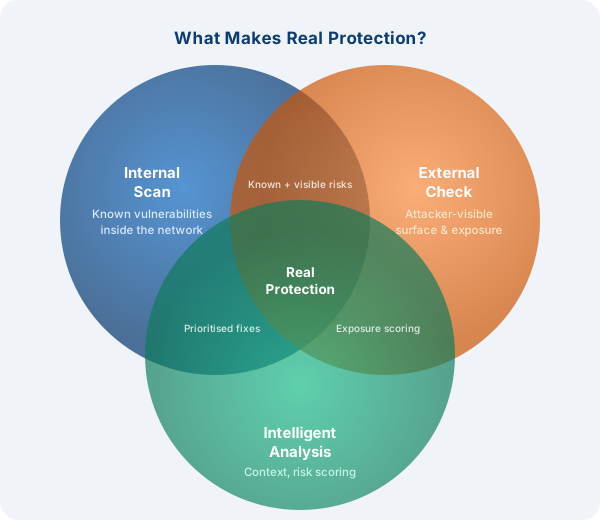
Internal vulnerability scanning and external security checking are not the same thing. They answer different questions. And for most threats your organization faces today, only one of them shows you the attack surface that actually matters.
What Is an Internal Vulnerability Scan?
An internal vulnerability scan runs from within your network. It authenticates to hosts, reads installed software versions, checks patch levels, audits configuration files, and compares everything against a database of known CVEs. Tools like Nessus, OpenVAS, or Qualys are the industry standard here.
This type of scan is valuable. It tells you what is broken on the inside — a Windows host that missed a critical patch, a database service running a version with a known injection flaw, an SSH server configured to allow weak ciphers.
But it only works from a position of trust. It runs inside your firewall perimeter. It already has network access. It may even have credentials.
An attacker starting from the internet has none of that.
What Is an External Security Check?
An external security check scans your infrastructure the way a real attacker would: from the outside, with no prior knowledge, no credentials, and no access to your internal network. It probes the IP addresses and domains that are publicly reachable and maps exactly what is visible and accessible to the rest of the internet.
A thorough external check covers:
- Open ports and services — which ports respond, what software is listening, and whether any services should not be publicly reachable at all
- TLS and certificate health — protocol version, cipher strength, certificate expiry, hostname mismatches, and self-signed certificates that browsers will reject
- HTTP security headers — whether your web server sends the headers that prevent clickjacking, content injection, and information leakage
- Origin exposure — whether your real server IP is hidden behind a CDN or WAF, or whether it can be reached directly, bypassing all your protective layers
- BGP and network identity — which autonomous system owns your address space and whether any routing anomalies are present
- CVE matches — known vulnerabilities in the specific software versions advertised by your exposed services
What Internal Scans Miss
The gap between what an internal scan reports and what an attacker actually sees can be significant. Here are the most common blind spots:
Misconfigured firewall rules
An internal scan runs after the firewall has already let it through. It cannot tell you whether port 3306 (MySQL) or port 27017 (MongoDB) is reachable from the internet because of a misconfigured rule. An external check will find that immediately.
Exposed management interfaces
Admin panels, router management pages, IoT device interfaces, and remote desktop services are sometimes unintentionally exposed to the internet. An internal scan inventories them; an external scan tells you whether anyone on the internet can reach them right now.
CDN bypass vulnerabilities
Many organizations invest in a CDN or WAF to filter malicious traffic. But if the origin server IP address can be discovered — through DNS history, TLS certificate transparency logs, or direct probing — an attacker can bypass the CDN entirely and attack the unprotected origin. An internal scanner will never detect this. An external check that tests direct-IP access will.
TLS and certificate issues
A web server can be fully patched internally but serve an expired certificate, support TLS 1.0, or use a weak cipher suite. These issues are invisible to internal scanners but immediately visible to every browser, every security researcher, and every attacker who connects to port 443.
The attacker's actual entry point
Most breaches begin externally. A phishing link, an exposed RDP port, a login page without rate limiting, an outdated VPN gateway. The attack surface that actually faces your adversaries is the external one.

Why External Scanning Cannot Be Replaced
Internal scanning is a compliance and hygiene tool. It answers the question: are our internal systems patched and configured correctly? That is an important question, but it is not the same as: what can an attacker on the internet do to us right now?
External scanning answers the second question. It shows your exposure as it actually exists — not as you assume it to be from behind the firewall. It is the only way to verify that:
- Your firewall rules are doing what you think they are
- Your CDN is actually protecting your origin and cannot be bypassed
- The ports and services facing the internet are the ones you intended to expose
- Your TLS configuration would pass a browser security check
- No forgotten legacy service is sitting open on a non-standard port
No amount of internal scanning can substitute for this. The two approaches are complementary — not interchangeable.
Which One Do You Actually Need?
The short answer: both. But if you are resource-constrained and need to prioritize, start with the external check.
The reasoning is straightforward. An attacker cannot exploit an internal misconfiguration if they cannot get inside your network. Your perimeter is the first line of defense. If it is porous, everything behind it is at risk regardless of how well your internal scan scores.
Once your external exposure is understood and controlled, internal scanning adds the next layer — catching the vulnerabilities that would matter if an attacker does get inside, whether through a phishing compromise, a supply chain issue, or a misconfigured VPN.
How Front Screen Fits In
Front Screen is an external security check tool. It scans your IP addresses and domains from the outside and shows you exactly what is visible to the internet — open ports, TLS health, HTTP security headers, origin exposure, CVE matches against detected service versions, and more.
It does not replace a full internal vulnerability management program. What it does is give you immediate visibility into your external attack surface — the part that your adversaries see first.
Run it against your infrastructure today. You may be surprised what is visible from the outside.