Network load balancers are a standard tool for distributing traffic across multiple backend servers. They are widely trusted to improve availability and absorb sudden spikes in demand. That trust is often well placed — but it comes with an assumption that is easy to overlook: a network load balancer does not hide your backend hosts from a determined attacker. It distributes traffic to them.
This distinction matters more than most teams realise. The load balancer absorbs volume by spreading it. If an attacker can identify and reach an individual backend server directly, the distribution mechanism becomes irrelevant.
How network load balancers work — and what that reveals
Unlike application-layer proxies, network load balancers operate at the transport layer. They forward TCP connections to backend instances with minimal modification. Many deployments preserve the original source IP, pass through the TCP handshake directly to the backend, and do not terminate or inspect HTTP traffic.
This transparency is a design goal — it keeps latency low and avoids the overhead of full-proxy behaviour. But it also means the load balancer does not act as a true shield. The backend hosts remain network-addressable, and the balancer's presence can often be confirmed through passive observation alone.
Signs an NLB is in the path
Several signals can indicate a network load balancer is handling traffic between a client and the application host:
- TTL jitter — when the same IP is probed repeatedly and the TTL values in replies vary, it often means different backend instances are answering. Each host may have a slightly different network distance, producing inconsistent TTL readings across multiple requests.
- Application-layer indicators — in practice, NLBs are commonly paired with an application load balancer, reverse proxy, or CDN sitting in the path. These Layer 7 components inject HTTP response headers (such as
x-amzn-trace-id,cf-ray, orx-azure-ref) and sticky-session cookies (such asAWSALBorBIGipServer) that identify the load balancing vendor. While these signals originate from the application layer rather than the NLB itself, their presence still confirms a load balancing stack is in the path.
None of these signals require privileged access or active exploitation. They are observable through normal HTTP requests and ICMP probes.
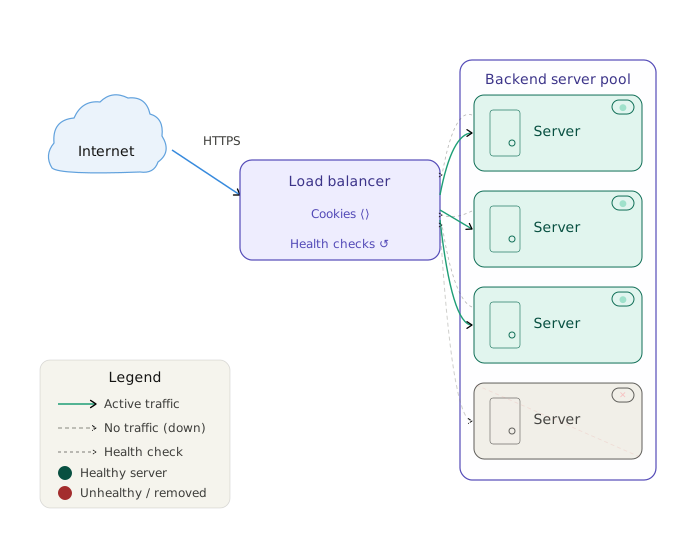
The health check problem
Load balancers use health check endpoints to decide whether a backend host is ready to receive traffic. These endpoints — commonly paths such as /health, /healthz, /ping, or /status — are polled continuously by the balancer itself to monitor liveness.
In a well-controlled environment, health check endpoints are reachable only from the load balancer's internal probe addresses. In practice, however, it is common to find them accessible directly from the internet — either because the port was left open in a security group, a firewall rule is too broad, or the endpoint was never restricted at the application level.
An exposed health check endpoint does more than leak information about backend availability. It provides a direct connection path to an individual backend host, bypassing the load balancer entirely.
Why this creates a single-node denial-of-service vector
The capacity benefit of a load balancer depends on the assumption that incoming traffic is spread across multiple hosts. A single backend can absorb some fraction of total capacity — and when it is overwhelmed, the balancer routes traffic elsewhere.
That assumption breaks when an attacker targets one backend host directly through its exposed health check port. In this scenario:
- Traffic arrives at the backend without passing through the load balancer's distribution logic
- The backend receives the full load of the attack on its own
- The load balancer continues routing normal traffic to the same host until its health check fails
- If the health check itself is the target, the host may appear healthy to the balancer while already being unable to serve application traffic
This is an effective single-node denial-of-service attack against infrastructure that was designed to resist exactly that kind of pressure.
A realistic example
Consider a web application running across four backend servers behind a network load balancer. The team believes the load balancer provides resilience: no single server can be overwhelmed because traffic is split evenly. The health check path is /health on port 80, polling every few seconds from the balancer's private subnet.
An attacker probes the public IP and observes TTL jitter and a sticky-session cookie identifying the load balancer vendor. They then scan common health check paths on ports 80 and 8080. One of the backend hosts responds to /healthz on port 8080 from the public internet — the port was opened for the health check and never restricted by source IP.
The attacker now has a direct path to one backend, bypassing the distribution layer. They do not need to generate traffic at the level required to saturate the full cluster. They only need to saturate one node.
What to check in your own environment
If you are running load-balanced infrastructure, it is worth reviewing a few specific points:
- Are health check ports restricted to the load balancer's source addresses only, or are they reachable from the broader internet?
- Do any health check paths respond with useful status detail that could help an attacker confirm backend liveness?
- Are backend instances accessible on ports that are not part of the intended public service?
- Do response headers or cookies disclose the load balancer vendor or backend identity?
Reducing the risk
The most effective controls are straightforward:
- Restrict health check access by source IP — in cloud environments, this typically means a security group or network ACL rule that allows health check traffic only from the load balancer's designated probe addresses.
- Separate health check ports from application ports — if possible, run health checks on a port that is not otherwise exposed, and ensure that port is firewalled at the perimeter.
- Minimise what health check endpoints disclose — a health check that returns a plain 200 OK reveals far less than one that returns full service status, version numbers, or dependency health.
- Review backend reachability regularly — infrastructure changes during deployments, scaling events, and migrations. Firewall rules that were correct at initial setup may not survive later changes.
- Verify that backends are not directly addressable — in cloud environments, backend instances should not have public IPs unless there is a specific reason. Route all external traffic through the load balancer.
The broader point
Load balancers improve resilience under normal conditions. They are not a substitute for perimeter controls on the backend hosts they serve. An infrastructure design that relies on a load balancer to prevent direct backend access is depending on a tool that was not designed for that purpose.
The right posture is to treat backend hosts as internal resources that happen to be reachable from one specific source — the load balancer — and to enforce that restriction at the network layer. When that enforcement is in place, the capacity benefits of load balancing and the protection benefits of proper network segmentation both apply at the same time.
Identifying these gaps before an attacker does is exactly the kind of visibility that makes infrastructure genuinely more resilient, not just more distributed.