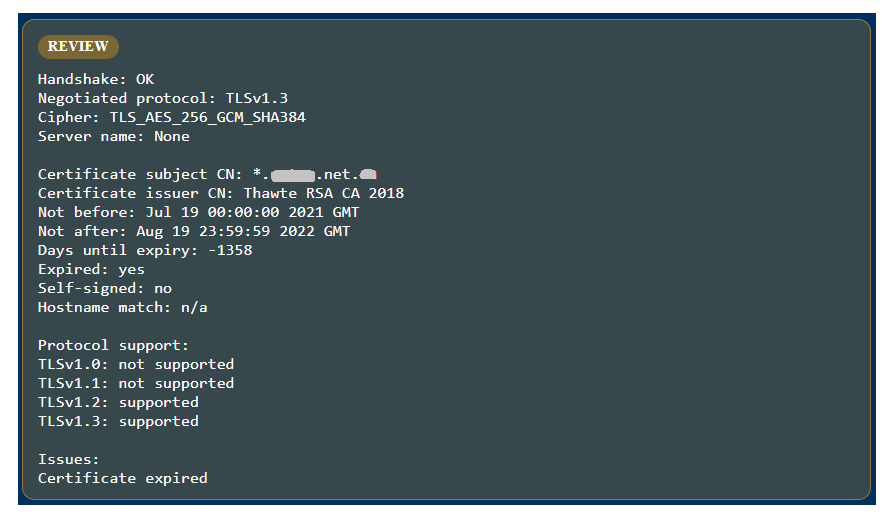
A Front Screen check identified two issues that should be reviewed together: an expired TLS certificate and multiple CVE matches on exposed public services. Neither finding automatically proves compromise, but both are important signals on an internet-facing target.
What was found
The TLS / SSL check completed a successful handshake using TLS 1.3 and a modern cipher, but the certificate had expired. The certificate validity ended on August 19, 2022, and the check reported Certificate expired.
The port scan also found public services on 443/tcp and 541/tcp. Port 443 was identified as an SSL HTTP proxy with an HAProxy fingerprint. The CVE check returned about 20 matches, including several high and critical findings related to HAProxy behavior such as denial of service, HTTP/2 handling, request smuggling, and access-control bypass conditions.
Why an expired certificate is a problem
An expired certificate is not just a cosmetic issue. Browsers, API clients, monitoring systems, and partner integrations may reject the connection or warn users that the service cannot be trusted. That can cause outages, failed automation, and loss of customer confidence.
It is also an operational signal. If a public certificate remains expired for a long period, it may indicate weak ownership tracking, broken renewal automation, or an unmanaged public-facing asset.
Why CVEs with exposed ports need immediate review
CVE matches become more urgent when they appear alongside reachable public ports. In this case, the strongest connection is to 443/tcp, where the service fingerprint indicated HAProxy. Many of the CVEs returned by the check were HAProxy-related, so the software version behind that port should be validated and patched if affected.
The exposed 541/tcp service should also be investigated, but the available evidence does not clearly tie the HAProxy CVEs to that port. It should be confirmed separately: identify the service, verify whether it is intended to be public, and restrict access if it is not required.
Recommended response
- Renew or replace the expired TLS certificate and confirm the full certificate chain is valid externally.
- Identify the service owner for port 443 and confirm the actual HAProxy version or vendor build.
- Review the CVE list against the confirmed software version, prioritising critical and high findings first.
- Patch or upgrade affected proxy software where the installed version is vulnerable.
- Validate port 541, document why it is exposed, and restrict it if it is not required from the internet.
- Reduce exposure while patching using firewall rules, allowlists, or temporary access restrictions.
The lesson
Certificate expiry and CVE exposure are different problems, but together they point to the same risk: public-facing services need continuous review. A service can still answer traffic and negotiate strong TLS while presenting an expired certificate. A proxy can appear functional while matching known vulnerability patterns.
When expired certificates, exposed ports, and CVE matches appear together, the safest response is prompt ownership review, certificate renewal, version validation, and patching.